DisplayAdd1

TechnoTechDB is a platform, which will help to grow your carrier in Information sector. Having 15 years of Experience in Oracle/MongoDB/Postgres/Mysql databases, along with having good expertise level of knowledge in Scripting to automate database task. Our goal to start with zero to hero level expertise in Database. You can access/refer my some blogs on https://mrorcldba.blogspot.com link and post your comments and your suggestion to motive us.

Saturday, 6 August 2022

Restarting (1) 9 seconds ago while running docker-compose up -d for bitnami/postgresql-repmgr:12.11.0 image.

 Hello Guys, 


This is blog is related to issue of bitnami/postgresql-repmgr:12.11.0  docker image setup. While I was performing setup of bitnami/postgresql-repmgr image, I was facing below error and docker was running Restarting mode.


INFO  ==> ** Starting PostgreSQL with Replication Manager setup **
INFO  ==> Validating settings in REPMGR_* env vars...
ERROR ==> The node name does not follow the required format. Valid format: ^.*+-[0-9]+$

$ docker ps 
CONTAINER ID   IMAGE                               COMMAND                  CREATED         STATUS                          PORTS     NAMES
f9be9b16b283   bitnami/postgresql-repmgr:12.11.0   "/opt/bitnami/script…"   5 minutes ago   Restarting (1) 42 seconds ago             instance-1-a1

Solution : In my case below docker-compose.yml was used and  found recommendation was do not use  container/service/rep name like instance-1-a1, mean don't use double (-). 
Same updated and fixed my issue.

Original Creating problem:
------------------------------------
version: "3.0"
services:
  instance-1-a1:
    image: bitnami/postgresql-repmgr:12.11.0
    container_name: instance-1-a1
    restart: always
    networks:
      - database
    ports:
      - 5432:5432
    volumes:
      - ./instance-1-a1/conf/:/bitnami/repmgr/conf/
      - ./instance-1-a1/logs/:/opt/bitnami/postgresql/logs/
    environment:
      - POSTGRESQL_PASSWORD=XXXXXXXXXX
      - POSTGRESQL_POSTGRES_PASSWORD=XXXXXXXXX
      - POSTGRESQL_USERNAME=postgres
      - POSTGRESQL_DATABASE=pg-db
      - REPMGR_NODE_NETWORK_NAME=host1
      - REPMGR_NODE_ID=1
      - REPMGR_PASSWORD=xxxxxxxxx
      - REPMGR_PRIMARY_HOST=host1
      - REPMGR_PRIMARY_PORT=5432
      - REPMGR_PARTNER_NODES=host1,host2:5432,host3:5432
      - REPMGR_NODE_NAME=instance-1-a1
      - REPMGR_LOG_LEVEL=DEBUG
      - REPMGR_PORT_NUMBER=5432
networks:
  database:
    external: true


Updated docker-compose.yml which fixed the problem:
--------------------------------------------------------------------

version: "3.0"
services:
  instance-1:
    image: bitnami/postgresql-repmgr:12.11.0
    container_name: instance-1
    restart: always
    networks:
      - database
    ports:
      - 5432:5432
    volumes:
      - ./instance-1-a1/conf/:/bitnami/repmgr/conf/
      - ./instance-1-a1/logs/:/opt/bitnami/postgresql/logs/
    environment:
      - POSTGRESQL_PASSWORD=XXXXXXXXXX
      - POSTGRESQL_POSTGRES_PASSWORD=XXXXXXXXX
      - POSTGRESQL_USERNAME=postgres
      - POSTGRESQL_DATABASE=pg-db
      - REPMGR_NODE_NETWORK_NAME=host1
      - REPMGR_NODE_ID=1
      - REPMGR_PASSWORD=xxxxxxxxx
      - REPMGR_PRIMARY_HOST=host1
      - REPMGR_PRIMARY_PORT=5432
      - REPMGR_PARTNER_NODES=host1,host2:5432,host3:5432
      - REPMGR_NODE_NAME=instance-1
      - REPMGR_LOG_LEVEL=DEBUG
      - REPMGR_PORT_NUMBER=5432

networks:
  database:

    external: true


Note: Updated parameter marked in bold above, do not change hostname or any folder name.

$docker-compose down -v 

$docker-compose up -d 

$  docker ps

CONTAINER ID   IMAGE                               COMMAND                  CREATED          STATUS          PORTS                                       NAMES

c5ad890ff90b   bitnami/postgresql-repmgr:12.11.0   "/opt/bitnami/script…"   37 minutes ago   Up 37 minutes   0.0.0.0:5432->5432/tcp, :::5432->5432/tcp   instance-1


Thanks !!!

Monday, 1 August 2022

How to enable or disable Hyper-v in 11th Gen Intel(R) Core(TM) i5-1135G7 @ 2.40GHz[Cores 4] [Logical processors 8]

 Hello Guy's

Last 6 months back I purchased new DELL Inspiron 3501 laptop with below configuration.


Memory: 32 GB

Processor: 11th Gen Intel(R) Core(TM) i5-1135G7 @ 2.40GHz[Cores 4] [Logical processors 8]

Operating System: Microsoft Windows 10 Home Single Language


Due to some project related testing I need to test about hyper-v  enable and disable, but I was surprised because I can't see hyper-v option in "Windows Features" also checked in BIOS unfortunately it was enabled by default and not allowing me to disable it. 


Tried to communicate with Dell they told it is fee-paid services and not ready to tell anything about how to enable or disable this hyper-v option. 


Please refer my snapshot of "Windows Features" box take before perform R&D on my laptop.


I asked with help of some colleague found below code which fixed my problem and I did my testing successfully. 


--> Please copy below lines between # into a .bat file and run. It would take approx 20 minutes to complete download and setup hyper-v, at last it will ask to reboot take a reboot it will show you hyper-v option along with hyper-v console.


#------------------------------------------------------

pushd "%~dp0"

dir /b %SystemRoot%\servicing\Packages\*Hyper-V*.mum >hyper-v_install.txt

for /f %%i in ('findstr /i . hyper-v.txt 2^>nul') do dism /online /norestart /add-package:"%SystemRoot%\servicing\Packages\%%i"

del hyper-v_install.txt

Dism /online /enable-feature /featurename:Microsoft-Hyper-V -All /LimitAccess /ALL

pause

#------------------------------------------------------


Note: Pleas perform above steps at your own risk.


Thanks a lot Team. 


How To Set new hostname or Rename or Change HostName in Linux

 Hello Friends, 

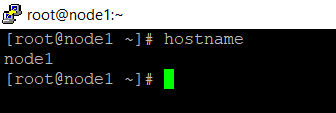
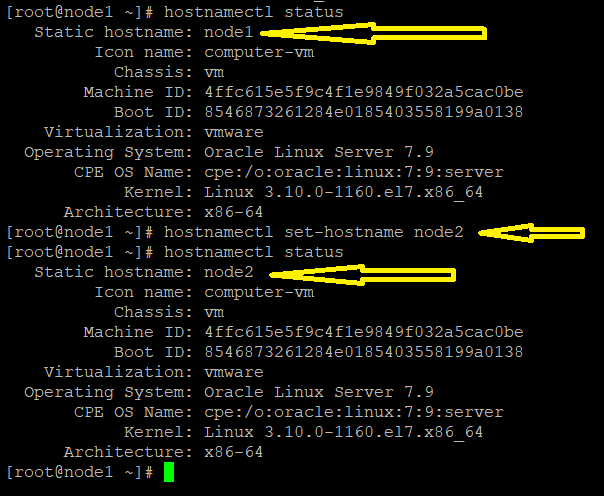
Most of the time when we are working VM or preparing Lab to work on any issue , we can setup one VM machine and don't want to create any new machine so we decided to copy the VM. but Most of us face problem or challenges to change hostname. Like rename node1 to node2 etc.


 We have few steps to change hostname as below.

Note: I have testing these steps on  "3.10.0-1160.el7.x86_64"  OS kernel.


Command list which has been perform for above demo.


1. uname -a

2. hostname 

3. hostname -I

4. hostnamectl status

5. hostnamectl set-hostname node2

6. hostnamectl status

7. ssh 192.168.3.4 (take IP from step 3)

8. hostname # It will show new hostname as "node2"


Wednesday, 20 July 2022

How to get Actual Total and Free size of tablespace when autoextend on .

Hello Friends, 

Below Test I have done for those people, who are curious to know or monitor free and total tablespace size when autoextend on. Because most of our DBA use below generic script to monitor tablespace which actually don't show till what extent or size this tablespace will grow and they add another datafile. 


Tried to show how, you can check and can avoid datafile addition. You may test below steps at on your own lab and see the result. 


1. Create a test tablespace.


2.  Check the used size of newly created tablespace, it will now show when you will run below query. Because tablespace this time does not contain any segment. 

3.   Create a dummy table and run query from step 2, now it will show test1 tablespace because it has a dummy segment in this tablespace.


4.  start in insert data in table1 and open another terminal when you will continually have to monitor (from step2) how tablespace test1 is gowning.


See below how tablespace is growing when we insert data into tablespace.


Saturday, 23 January 2016

Clone database from ACTIVE standby database.

Clone database from ACTIVE standby database.

below steps are useful when you already have ORCL_T datbase  ::

SOURCE : STANDBY DATABASE (ORCLSTDBY)

TARGET : TEST DATABASE (ORCL_T)

-- on Testing ( ORCL_T DB) DB

alter system set log_file_name_convert='+DATA_GROUP/orclstby/onlinelog/','+DATA_GROUP/orcl_t/onlinelog/' scope=spfile;
alter system set db_file_name_convert='+DATA_GROUP/orclstby/datafile/','+DATA_GROUP/orcl_t/datafile/' scope=spfile;
alter system set db_unique_name=orcl_t scope=spfile;

create pfile='/tmp/initorcl_t.ora' from spfile;
alter system set cluster_database=false scope=spfile;
shut immediate;
STARTUP NOMOUNT RESTRICT;
ALTER DATABASE MOUNT;
DROP DATABASE;

-- on Standby DB

alter database flashback off;
alter database recover managed standby database cancel;

-- on Testing(For Clone DB) DB

STARTUP NOMOUNT pfile='/tmp/initorcl_t.ora';
Create spfile from pfile='/tmp/initorcl_t.ora';
Startup mount
rman  target  sys/oracle@orclstby auxiliary   sys/oracle@orcl_t

--activerestore_final.cmd

run {
allocate channel C1 device type disk;
allocate channel C2 device type disk;
allocate channel C3 device type disk;
allocate channel C4 device type disk;
allocate channel C5 device type disk;
allocate auxiliary channel C6 device type disk;
allocate auxiliary channel C7 device type disk;
duplicate target database to orcl_t from active database;
release channel C1 ;
release channel C2;
release channel C3;
release channel C4;
release channel C5;
}

-- Make no archivelog on cloned DB.

-- on Standby DB
alter database flashback on;
ALTER DATABASE RECOVER MANAGED STANDBY DATABASE USING CURRENT LOGFILE DISCONNECT;

Archive log gap Resolve on standby using RMAN incremental backup


Resolve Archive log gap on standby using RMAN incremental backup if missing of logs from standby and  primary.


--on standby

SQL>  select distinct checkpoint_change# from v$datafile_header order by 1;

note down minimums SCN number for incremental  backup


--on Primary

RMAN> run
 {
 BACKUP as compressed backupset device type disk INCREMENTAL FROM SCN 6504939829410 DATABASE FORMAT '/var/opt/backups/incremental_orcl_%U' tag
  'FOR_STANDBY_24July_2015';
 }

RMAN>  backup current controlfile for standby format '/var/opt/backups/new_orcl_contorl_stb.ctl';

sftp oracle backup to standby database


--on standby

NOTE down data FILE ID name FILE name of datafile on standby in case of data file rename.
NOTE down temp FILE ID and name FILE name of datafile on standby in case of temp data file rename.
NOTE down redo name FILE name of datafile on standby.


SQL>set head off pages 0 feed off echo off verify off
SQL>set lines 200
SQL>spool rename_datafiles.lst
SQL>select 'SET NEWNAME FOR DATAFILE ' || FILE# || ' TO ''' || '+asm_data_dg/dbci1sb/datafile/' || substr(name,instr(name,'/',-1)+1) || ''';' from v$datafile;
SQL>spool off

SQL>set head off pages 0 feed off echo off
SQL>spool rename_logfiles.lst
SQL>SELECT 'SQL "ALTER DATABASE RENAME FILE '''''||  MEMBER ||'''''' ||chr(10)||'to ''''' || member || '''''" ;' FROM V$LOGFILE;

SQL> create pfile='/tmp/init.ora' from spfile;
SQL> alter database backup controlfile to trace as '/tmp/col_ctrl.sql'


RMAN> report schema
RMAN> list incarnation of database;
RMAN> backup current controlfile  format '/var/opt/backups/orcl_contorl_stb_old.ctl';

SQL> shut immediate
shut down database and remove old controlfile

SQL>  startup nomount
RMAN> restore contorlfile from '/var/opt/backups/new_orcl_contorl_stb.ctl';
RMAN>  run
{
SET NEWNAME FOR DATAFILE 1 TO '+ASM_DATA_DG/orcldbci1sb/datafile/system.1590.859964471';
SET NEWNAME FOR DATAFILE 2 TO '+ASM_DATA_DG/orcldbci1sb/datafile/sysaux.1081.859965099';
SET NEWNAME FOR DATAFILE 3 TO '+ASM_DATA_DG/orcldbci1sb/datafile/undotbs1.1079.859975849';
SET NEWNAME FOR DATAFILE 4 TO '+ASM_DATA_DG/orcldbci1sb/datafile/undotbs2.2493.859958385';
SET NEWNAME FOR DATAFILE 5 TO '+ASM_DATA_DG/orcldbci1sb/datafile/users.1532.859968013';
switch datafile all;
switch tempfile all;
}

RMAN> recover database noredo;


RAC useful commands.


Status of database and Node

             srvctl status database -d PRDDB


Start database / Node ::::

               srvctl start nodeapps -n HOST01
               srvctl start nodeapps -n HOST02
               srvctl start asm -n HOST01
               srvctl start asm -n HOST02
               srvctl start database -d PRDDB
               srvctl start instance -d dbname -i instancename

Start Database in mount stage :
 
              srvctl start database -d db_name -o mount

Stop database / Node :::::

               srvctl stop database -d PRDDB
               srvctl stop asm -n HOST01
               srvctl stop asm -n HOST02
               srvctl stop nodeapps -n HOST01
               srvctl stop nodeapps -n HOST02
               srvctl stop instance -d dbname -i instancename
               srvctl stop database -d dbname -o immediate

rsctl start cluster
crsctl status resource -t
crsctl stop cluster -all

Steps to Rename Host in Oracle RESTART (ASM) in Linux

  oracle@localhost ] asmcmd ASMCMD> lsdg State    Type    Rebal  Sector  Logical_Sector  Block       AU  Total_MB  Free_MB  Req_mir_free_...